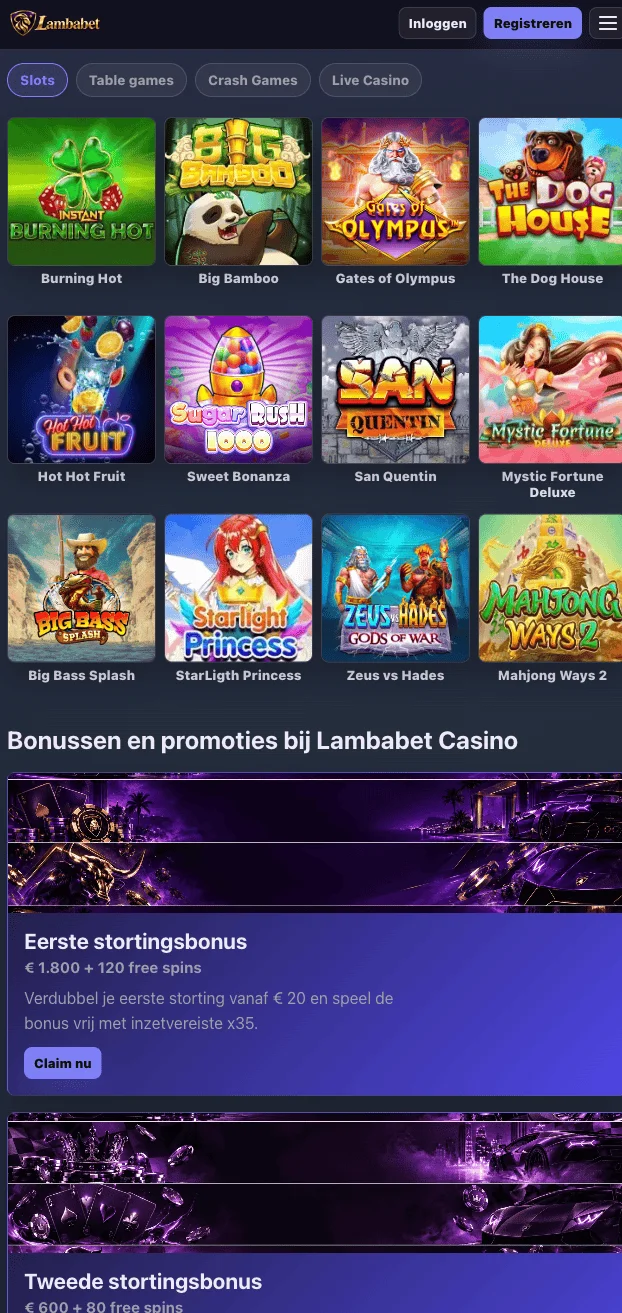
Lambabet Casino App
You can download the Lambabet Casino app straight from lambabet.uk and start playing from your phone in minutes. The app is for adults only, minimum age 18, and it brings the full account, catalogue and cashier into your pocket. There is no need to hunt for ratings or extra buttons here, just a straightforward download and a game that fits in your hand.
LambaBet App on Your Phone
The lambabet app gives you one account that logs in the same way whether you are on your phone or sitting at a laptop. Your login details, your balance and your game history carry over without any extra steps, because the account is identical in the app and in the browser. The catalogue inside the app holds the same 4,500+ games you would find on the desktop site, with search built in so you can jump straight to a title rather than scrolling. Deposits and withdrawals run through the same menu structure you would expect, and support sits one tap away if a question comes up mid session.
We built this for players across the United Kingdom who want to play on a train, on a lunch break or from the sofa, without carrying a laptop around. Treat it as entertainment within a budget you set before you start, not as a way to make money. The screens are built for touch, and they rotate cleanly between portrait and landscape depending on the game. Whether you tap the lambabet app icon or open lambabet.uk in a browser, you are reaching one service, two doors into the same room. Requirements and file sizes for each device sit in the table under Platforms, so there is no need to repeat numbers here.
Features of Lambabet Casino App
Every feature in the lambabet app mirrors what you already know from the site, just arranged for a smaller screen. Here is what sits where, and what you get in each spot.
| Feature | Where in the app | Details |
|---|---|---|
| Game catalogue | Home screen and search | 4,500+ games, searchable by name or category |
| Deposits | Menu, Wallet, Top up | Visa, Mastercard, PayPal and Skrill, minimum £5, maximum £8,000, credited instantly |
| Withdrawals | Menu, Wallet, Withdraw | Minimum £20, maximum £8,000, processed from a few hours to 2 business days |
| Account and login | Menu, Security, Verify | One registration, same details in the app and the browser |
| Support | Menu, Help, Contact | support@lambabet.uk, reply within 24 hours |
| Touch navigation | Any screen | Portrait and landscape, swipe between categories |
You install the app once, and after that it behaves exactly like the version in your browser, which needs no installation at all. From that point the experience lines up screen for screen, so switching between the two never costs you a login or a lost game.
Platforms and Requirements
Before you download anything, open Settings on your iPhone or Android phone and check your system version and free storage, both of which decide whether the install runs smoothly. The table below lists what each platform needs for the lambabet app.
| Device | Minimum version | Space and memory | Source | Install time |
|---|---|---|---|---|
| iPhone and iPad | iOS and iPadOS 15.0 | 160 MB | App Store or the steps shown on lambabet.uk | about a minute |
| Android phones and tablets | Android 9.0, 2 GB RAM | 130 MB | Google Play or the file on lambabet.uk | about two minutes |
| Browser | Chrome, Safari, Firefox or Edge | Nothing to install | lambabet.uk | a few minutes |
Older phones or tablets with little free space are better served by the browser, which skips the install entirely. You still land on the same account, the same balance and the same catalogue either way.
How to Download the Lambabet Casino App
Have your login details ready, make sure your connection is stable for the download time shown above, and confirm you have the free space listed in the table.
- Open lambabet.uk in your mobile browser and go to the app section.
- Choose your device, iPhone, iPad or Android.
- On iPhone and iPad, tap through to the App Store or follow the steps shown on the site.
- On Android, download the 130 MB file from Google Play or directly from the site, and allow installation from this source once when asked.
- Open the app and log in. Your balance and game history are already waiting for you.
During setup the app asks for two permissions, network access and notifications, because it needs a connection to load games and uses notifications to flag payouts. It never asks for your contacts, photos or location, and it never will.
App Settings Worth Switching On
These are the settings our team sees most players switch on in the first week, and all of them live under one menu section, Menu, Security or Menu, Wallet depending on the setting.
- Biometric login: Menu, Security, Face ID, unlock with Face ID or fingerprint instead of typing a password.
- Push notifications: Menu, Notifications, Payouts and games, alerts for payouts and new releases.
- Deposit limit: Menu, Wallet, Limits, set a daily, weekly or monthly cap.
- Session reminder: Menu, Notifications, Session reminder, choose a nudge every 30 or every 60 minutes.
- Demo mode: Menu, Games, Demo, try any slot without staking real money.
- Language and currency: Menu, Settings, Display, choose how the app shows text and your balance.
Gambling is entertainment within a budget set in advance, never a way to earn income. Of everything on that list, the deposit limit and the session reminder are the two we ask every player in the United Kingdom to set before the first deposit. Our responsible gaming page covers the rest of what is worth knowing.
Troubleshooting Download and Access Issues
Start with what the screen actually says, since most of these messages point to a specific fix rather than a general problem.
| What you see | Why | What to do |
|---|---|---|
| Download stops halfway | Connection dropped mid transfer | Reconnect to a stable network and restart the download from lambabet.uk |
| Not enough space | Device storage is below the required MB | Free up space, then check the table figure for your device |
| Install blocked on Android | Installing from this source was not allowed | Allow installation from this source once when prompted, then retry |
| App not compatible | System version is below the minimum listed | Update iOS, iPadOS or Android in your phone settings first |
| App opens then closes | A corrupted install or an outdated version | Delete the app and reinstall it from the App Store or Google Play |
| Login works in the browser but not in the app | Cached login data in the app is out of date | Go to Menu, Security, Login and sign in again |
While you sort any of this out, lambabet.uk stays open in your browser with the same account waiting. If the issue does not clear up, write to support@lambabet.uk with your phone model, system version and what you saw on screen, and our team replies within 24 hours.
Lambabet Casino App
The Lambabet Casino app puts the full 4,500+ game catalogue in your pocket, with the same account, balance and history you use on lambabet.uk. UK players can download it natively on iOS from the App Store or on Android from Google Play, then log in and pick up exactly where they left off. Deposits are credited instantly and withdrawals move through the same menu structure as the desktop site, so there is nothing new to learn. Push notifications flag payouts and new games the moment they land, and biometric login with Face ID gets you in without typing a password each time.
Download it once, play it anywhere.